My Exchange
- 3.4
- Rating
- 50.00K
- Installs
- Free
- Price

 Analysis by App-foxy
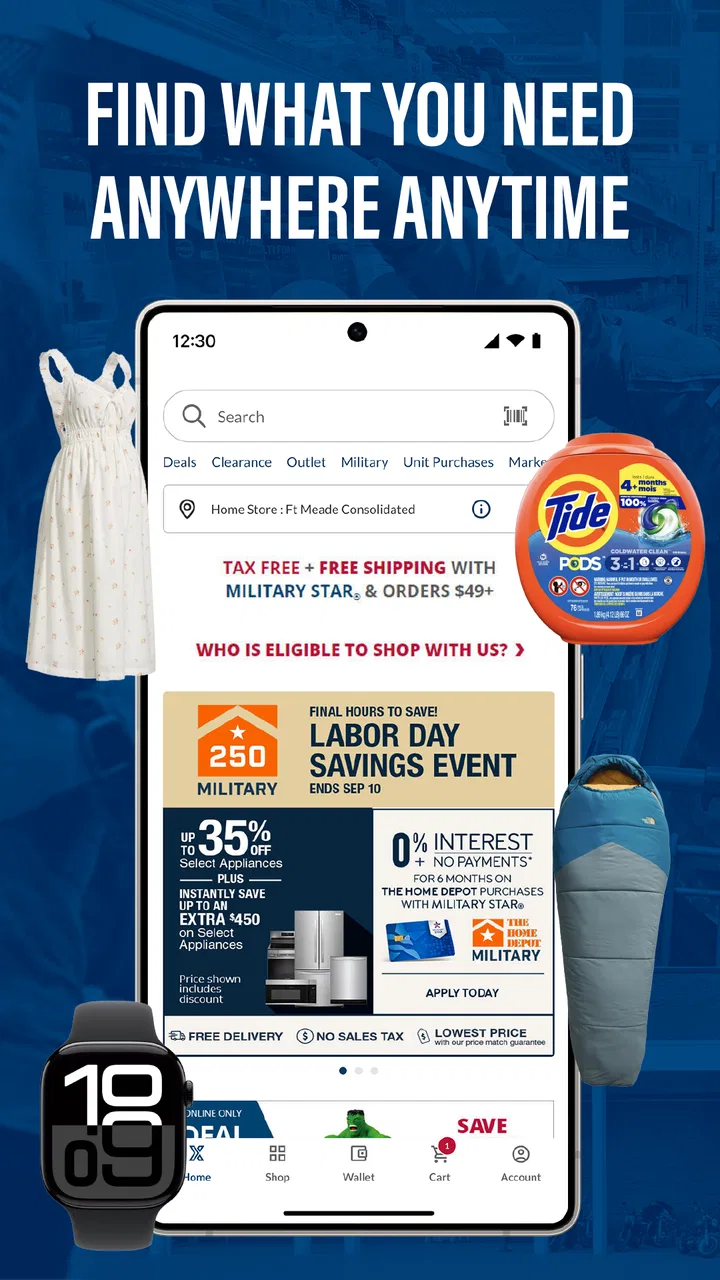
My Exchange is a free shopping app from Army & Air Force Exchange Service, built around a very specific audience: people who want to use military exchange benefits from a phone. I approached it less like a general marketplace and more like a practical access point for an existing shopping relationship. That distinction matters, because the right question is not whether it can replace every shopping app on your device. The better question is whether it makes exchange shopping easier enough to justify installing another app.
In my experience, the answer depends heavily on how often you use exchange services and whether your shopping decisions are influenced by military eligibility. For an eligible shopper who already visits an exchange or checks exchange products regularly, having a dedicated mobile route can be useful. For someone looking for the broadest possible marketplace, the app has a narrower purpose and should be judged on convenience rather than endless choice.
The app sits in the Shopping category and is marked for Everyone, while its current version is 1.0.8. It is free to install, so the main investment is your time: downloading it, signing in if needed, learning where the important areas are, and deciding whether it fits your normal routine. I would make that decision based on three things: how often you shop through the exchange, how much you value military-specific benefits, and whether you are comfortable using a dedicated app instead of a browser or a broader retail platform.
You May Also Like

 AccuWeather: Weather Radar
AccuWeather Review: A Quick, Clear Forecast for Everyday Decisions
For everyday plans, the best forecast is the one you can understand quickly. AccuWeather makes rain timing, radar, and local conditions easy to act on, with a few trade-offs.

 Hill Climb Racing
Why Hill Climb Racing Still Turns Crashes Into One More Run
A tiny car, a bumpy hill and one more upgrade: Hill Climb Racing keeps resurfacing because its simple chaos makes every near-miss feel personal.

 AliExpress - Shopping App
AliExpress Makes Global Shopping Feel Personal, but Shoppers Bear the Risk
AliExpress turns a global marketplace into a pocket-sized discovery engine. Its reach is useful, its shopping loop compelling, and its trade-offs easy to miss.

 Lords Mobile: Kingdom Wars
Lords Mobile Is a Kingdom-Building Routine, Not a Quick Match
A case-by-case verdict on the building, battles, device demands, and social commitments that make Lords Mobile rewarding for some players and exhausting for others.

 PDF Scanner app - TapScanner
TapScanner Makes Paperwork Easier to Capture, Check, and Share
TapScanner makes scanning with a phone feel less like a rescue operation and more like a dependable step in getting work done. Its capture tools are useful, though not flawless.

 Block Blast!
 Shows How Much a Puzzle Game Can Leave Out
A quiet grid game shows why puzzle players increasingly value instant clarity, repeatable skill and low-pressure play—and where the genre still needs to catch up.
More From Our News Desk
View All News


What I looked at before recommending it
When I review a focused shopping app like this, I do not start with the size of its catalog. I start with the complete shopping journey. Can I find what I need without wandering through unrelated departments? Does the app make the exchange connection clearer than a generic retailer would? Is it worth opening when I am already comfortable using another shopping method? Those questions are more useful here than comparing it with giant marketplaces on their own terms.
The developer, Army & Air Force Exchange Service, gives the app a clear identity. This is not an anonymous shopping tool trying to serve everyone. Its purpose is tied to exchange shopping and the benefits associated with that environment. That focus is its strongest reason to exist, but it also creates the app’s main limitation: people outside that audience may have little reason to keep it installed.
The published average is 3.4 from 152 ratings, with 96 written reviews. I would read that as a sign to keep expectations measured rather than assuming the experience will be perfect for every shopper. The app has passed 50K installs, which shows that it has reached a meaningful audience, but it is still a specialized tool rather than a universal shopping destination. In practical terms, I would install it with a specific purpose in mind, then judge it by whether it saves steps during real exchange shopping.
One useful way to test it is to avoid browsing aimlessly on the first visit. Instead, open it when you already have a realistic task, such as checking whether a commonly purchased item is available through the exchange or exploring a benefit-related shopping option. A focused test tells you much more than scrolling through categories for a few minutes.
Why the military-benefit focus changes the decision
The central appeal is not simply that this is another place to look at products. The appeal is the relationship between shopping and exclusive military benefits. That can make the app more relevant than a general retailer for an eligible user, even if a competing marketplace feels smoother for ordinary product discovery.
I would think of the app as a bridge between your phone and the exchange, not as a replacement for every retail habit. If you already know that exchange benefits influence where you shop, the dedicated focus can reduce the mental effort of remembering which retailer to check. That is a subtle advantage: the app keeps the benefit context attached to the shopping task instead of forcing you to compare broad marketplaces first and investigate eligibility or exchange relevance later.
There is also a practical advantage for households where more than one person makes purchases. A dedicated exchange app can give everyone a shared starting point, rather than having one person browse a general retailer while another separately checks exchange options. I would still compare the final value and convenience for each purchase, but the app can make the exchange part of the routine instead of an occasional afterthought.
Where it can save time in everyday shopping
Imagine a service member or military family member who notices during the week that a household item needs replacing. The usual process might be to open a familiar marketplace, search immediately, compare several sellers, and only later wonder whether the exchange offers a better fit for the purchase. With My Exchange already installed, I would reverse that order: check the exchange route first, confirm whether it suits the need, and then move to a general retailer only if the dedicated option is not convenient.
That workflow is valuable because it turns the app into a first-check tool. It does not require every purchase to end there. The benefit is that exchange shopping gets a fair look before habit sends you elsewhere. For occasional shoppers, that may be enough value to justify keeping the app available.
A second useful workflow is planning rather than impulse buying. If you know you will be shopping for several household needs, I would use the app to investigate exchange options in one sitting and make a short list before ordering anything. This reduces the chance of making separate, rushed searches across several retailers. The app’s focused identity is more helpful when you give it a defined shopping mission.
A third insight is that the app may be most useful as a comparison checkpoint, not necessarily as your only shopping destination. People often treat dedicated retail apps as all-or-nothing choices, but that is unnecessary here. I would check the exchange first, then compare with the retailer I normally use. That approach preserves the military-benefit advantage while avoiding the assumption that one app must win every purchase.
Where the dedicated approach is strongest
My Exchange wins when relevance matters more than sheer breadth. A general marketplace may offer countless products, sellers, and categories, but that abundance can also create noise. The exchange-focused app starts from a more meaningful question for its audience: what does this shopping channel offer me as an eligible customer?
That makes it especially suitable for users who already identify the exchange as a trusted part of their shopping routine. It can also help newer eligible users who are still learning how to incorporate exchange benefits into everyday purchases. Rather than treating the exchange as a physical location only, the app encourages a mobile-first habit, which is useful when you are away from a store or simply prefer to plan from your phone.
The free price also lowers the risk of trying it. I would not expect a specialized app to prove its value before installation when there is no purchase required just to evaluate it. The sensible approach is to try it during a real shopping need, then keep it only if it becomes a faster or more relevant route than your current method.
Another advantage is clarity of purpose. When an app is designed for a defined community, the shopping context can feel more direct than a broad service that treats military exchange benefits as irrelevant. That does not automatically guarantee a better interface or a better result on every product, but it does give the app a reason to be on your phone beyond generic browsing.
Where a browser or general retailer may fit better
I would not recommend replacing every shopping tool with My Exchange. If your priority is the widest selection, the fastest product discovery across unrelated retailers, or a single app for all household purchases, a broad marketplace may remain more convenient. That is not a failure of this app; it is a consequence of its focused role.
A browser may also be the better choice for very occasional users. If you shop through the exchange only once in a while, adding another app can feel like unnecessary maintenance. In that case, a mobile website or an existing account route may be enough, especially if you do not need regular reminders to check exchange options. The app makes more sense when its dedicated presence changes your behavior.
General retailers are also better suited to shoppers who compare many sellers at once or who already have a carefully organized purchase history, saved lists, and delivery routines elsewhere. I would not abandon a familiar system without a reason. Instead, I would use My Exchange for the purchases where the military-benefit connection is important, while keeping the broader retailer for searches where selection and comparison dominate.
There is a trade-off between focus and flexibility. A focused app can make a particular audience feel better served, but it may not be the most efficient place to begin when your shopping question is completely open-ended. If I am asking, “Which retailer has the largest range of options for this unusual item?” I would start broadly. If I am asking, “Should I check the exchange before buying this ordinary household product?” this app becomes much more relevant.
Small habits that make the app more useful
I would begin by treating the first session as a setup and orientation visit, not as a test of whether the app can replace a full shopping ecosystem. Learn where the exchange-related areas are, identify the route you would use for a normal purchase, and note how much effort it takes to get from opening the app to a useful result. That personal timing matters more than a generic claim that the app is convenient.
When comparing it with alternatives, compare complete tasks rather than isolated screens. Search for something you genuinely need, check the exchange option, then repeat the same search in your usual shopping app. Consider the number of decisions involved, how clearly the benefit context is presented, and whether you would remember to use this route next time. This method exposes the real trade-off between dedicated relevance and general convenience.
I would also avoid installing it only because the idea sounds useful. Install it when you can connect it to a shopping routine. For example, make it the first app you check before a planned exchange-related purchase for a month. If it repeatedly helps you make a more informed choice, it has earned its place. If you keep opening it without finding a practical role, uninstalling it is a reasonable decision.
For households, agree on a simple rule: use the app as the exchange check before moving to a general marketplace. That prevents the app from becoming a forgotten icon and avoids duplicated browsing. It also gives you a fair way to evaluate the service without expecting it to handle every kind of retail research.
What the rating and maturity suggest
The 3.4 average tells me to approach the experience with realistic expectations. I would not interpret it as proof that the app is unsuitable, but I would pay attention to friction during ordinary tasks. A specialized app can be valuable even when it is not the smoothest shopping product available, provided its audience-specific purpose saves enough effort.
The release date is Jan 23, 2026, and the app is currently at version 1.0.8. That places it in an early stage of its life, so I would expect the experience to be judged partly on whether it fits your needs now and partly on whether future updates improve the rough edges. I would keep the app updated through the normal store process, particularly if you rely on it for planned shopping rather than occasional curiosity.
Because the content rating is Everyone, the app is presented as suitable for a broad audience. That does not remove the need to consider eligibility and usefulness for your own situation, but it does make the app approachable for households where different age groups may use the same device or participate in shopping decisions. The important distinction is audience relevance, not age restriction.
The cost of switching from your usual shopping habit
Since the app is free, switching does not involve a subscription decision or a purchase commitment. The real cost is attention. You need to remember to open it, understand its role, and possibly repeat searches in another app when you want a broader comparison. For a frequent exchange shopper, that cost may be small. For an occasional user, it may outweigh the benefit.
I would avoid framing the choice as “My Exchange versus every other retailer.” That creates unnecessary work. A better transition is to add it as a first step for relevant purchases. Keep your usual marketplace for products where it is clearly stronger, and use this app when exchange benefits are part of the decision. This partial-switch approach is less disruptive and gives the app a fair chance to prove itself.
The most important switching question is whether the app changes your starting point. If you install it but continue to begin every shopping search elsewhere, the practical value will be limited. If it becomes a quick exchange check before larger purchases, the low financial cost makes experimentation sensible.
There is also a mental cost to maintaining multiple shopping apps. Notifications, account details, saved items, and different checkout habits can make a phone feel cluttered. I would keep My Exchange only if its military-specific purpose is distinct enough from your other apps. Its best justification is not that it does everything; it is that it gives eligible shoppers a dedicated place to begin.
Who should install it, and who should skip it
I recommend trying My Exchange if you are eligible for exchange benefits, shop through the exchange with some regularity, or want a more deliberate way to include exchange options in household purchasing. It is also worth considering if you often remember the exchange only after checking general retailers, because the app can help move that check earlier in the process.
I would be more cautious if you rarely shop through the exchange, dislike maintaining separate retail apps, or mainly want unrestricted comparison across many marketplaces. In those situations, your browser or existing general retailer may be the more efficient choice. The app’s focused purpose is an advantage only when that purpose matters to you.
For a first-time user, I would not judge it after a random browse. Use it for one planned purchase, compare the same task with your normal alternative, and decide whether the exchange-focused route feels worth repeating. That test answers the questions that matter: does it fit your eligibility, does it save a step, and does it make you more likely to consider exchange benefits before buying?
My recommendation after weighing the trade-offs
My Exchange is a sensible free download for its intended audience, but I see it as a specialized companion rather than a universal shopping replacement. Its strongest point is the direct connection between mobile shopping and exclusive military benefits. Its weakest point is the same narrow focus: shoppers who do not need that connection may find a general retailer or browser more useful.
I would recommend it to eligible military shoppers who want a consistent exchange-first routine. I would keep expectations practical, use it as a comparison checkpoint, and avoid demanding that it match the breadth of a mass-market marketplace. That approach makes the app’s purpose clearer and reduces the frustration of expecting one focused tool to cover every shopping scenario.
For me, the deciding test is simple: if opening the app before a purchase helps you remember and evaluate an exchange option, it is doing something your usual retailer may not do. If it adds another step without changing the result, it is probably not worth keeping. The best reason to install My Exchange is not convenience in the abstract; it is making military-benefit shopping part of your normal decision process.
With its free access, Everyone rating, and focused identity from Army & Air Force Exchange Service, the app is easy to try without treating it as a permanent commitment. I would install it for a real exchange-related shopping task, compare that experience with your usual alternative, and keep it only if the dedicated route earns a regular place in your routine.
FAQs for My Exchange
01What is My Exchange and what can I use it for?
My Exchange is an app designed to help users manage currency exchange information and related transactions from a mobile device. Depending on the version and region, it may provide exchange-rate monitoring, currency conversion, market updates, or access to exchange services. Before downloading, check the app listing carefully to confirm which features are available in your country and whether it supports the currencies you need.
02Is My Exchange free to download and use?
My Exchange may be available as a free download, but some functions can require fees, subscriptions, account verification, or transaction charges. Currency conversions and exchange services may also include a margin between buying and selling rates. We recommend reviewing the pricing information, terms of service, and any in-app purchase details before completing a transaction, especially if you plan to exchange larger amounts.
03Can I use My Exchange to exchange real money?
The answer depends on the specific services offered by the version of My Exchange available in your region. Some users may only receive exchange-rate information and calculation tools, while others may be able to place orders or manage funds through a supported provider. Do not assume that the app itself is a licensed financial service; verify its operator, regulatory status, supported countries, and transaction conditions first.
04Is My Exchange safe for personal and financial information?
Before creating an account, review the app’s privacy policy, developer details, requested permissions, and security practices. A trustworthy exchange application should explain how it protects login credentials, identity documents, payment information, and transaction data. Use a strong, unique password and enable two-factor authentication if available. Avoid using the app on unsecured public Wi-Fi when accessing sensitive financial information.
05What should I check before downloading My Exchange?
Check that the application is published by the official developer and download it only from a legitimate app store. Read recent user reviews, examine the update history, confirm device compatibility, and verify whether the app works in your country. You should also look for information about supported currencies, withdrawal or transfer limits, customer support, verification requirements, and possible fees before relying on it for important exchanges.
Pros
- Simple interface makes checking exchange rates quick.
- Supports comparing multiple currencies in one place.
- Useful for planning travel budgets and international purchases.
- Rates are presented clearly for easy at-a-glance reading.
- Lightweight design should work well on most modern devices.
Cons
- Exchange rates may differ from those used by banks or card providers.
- Some features may require an internet connection to update data.
- Currency coverage may not include every local or less common currency.
- Ads or promotional content can reduce the visual clarity of the app.
- Rate update timing may vary
- so figures may not reflect live market changes.

My Exchange
Gallery